

Subscribe To Our Newsletter!
Subscribe to the newsletter to stay up to date with the latest news and most useful
Newsletter
↑
Back to Top


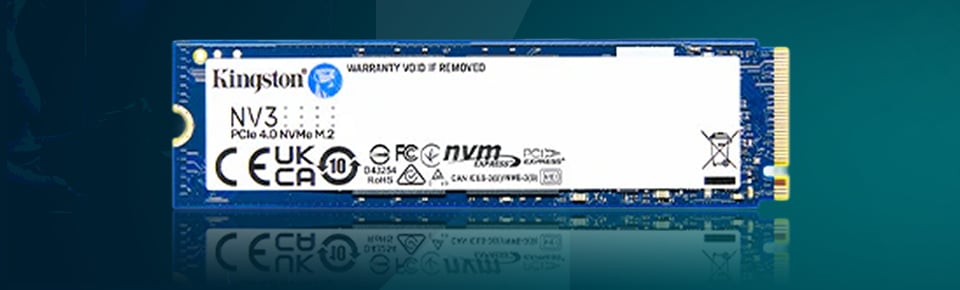
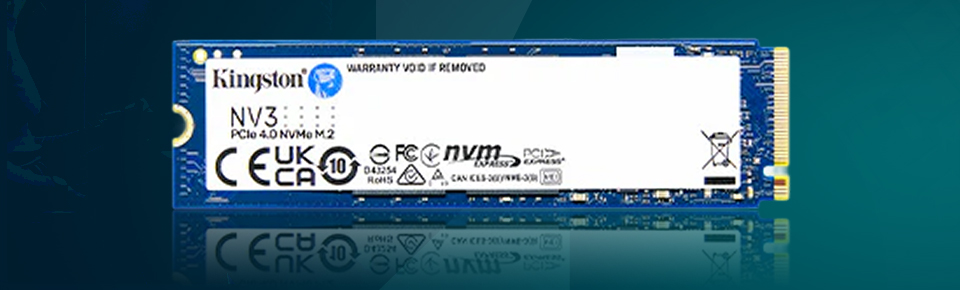
The Kingston NV3 SSD is designed for users seeking speed at a reasonable price. It’s not the speediest SSD you can buy. But it does deliver goodish PCIe Gen4 performance on a budget. So, if you are gaming, editing, or need faster load times, the NV3 offers a good cost-to-speed ratio.


Before we get to benchmark results, let’s take a look at this solid-state drive’s key features and more:
· Interface: PCIE Gen4 ( × 4) NVMe 1.4
· Speeds: Up to 6,000 MB/s read, up to 5,000 MB/s write (up to)
· Capacities: 500GB, 1TB, 2TB, 4TB
· Form Factor: M.2 2280
· Endurance: Up to 1,280TBW (capacity dependent)
· Compatible with: Windows, Linux, laptops, desktop computers, and PS5 as well.
· Cooling: No heatsink included, depending on the system environment, factory data cooling
· Warranty: 3-year limited warranty
The Kingston NV3 features a M.2 2280 slim design. It's also great for those small laptops, gaming rigs, and mini PCs. The one-sided design of this ad copy fits without clearance issues. But it does not include a heatsink. So, that build might be solid and dependably cool … though heavy users might want some extra cooling efficiency.
The heat is an issue, like most Gen4 SSDs. Temperatures can be managed under ordinary operation. However, during prolonged writes, the NV3 can run quite hot. It may throttle a little without a heatsink. Most contemporary motherboards, however, do have built-in cooling for M.2 drives. So with good airflow, heat is not much of an issue.


When it comes to speed, well, the NV3 is not a disappointment. It provides up to 6,000 MB/s sequential read and 5,000 MB/s sequential write. That's a lot faster than older SATA or PCIe Gen3 SSDs. In practical use, boot times are lightning-fast, apps load immediately, and multitasking is snappy.
For gamers, the contrast is stark. Load times are quicker, big titles boot up faster, and movement through gameplay is responsive. Professionals will find themselves able to perform light photo and video editing without issue. “I think a more powerful SSD speed for higher capacity files only lasts before the cache gets full, and you will get reduced writing speeds.” (However, because it’s a DRAM-less SSD, there can be a speed drop after the cache gets filled during giant transfers. That means it’s excellent for typical workloads but not ideal for high-production environments.
The NV3 was designed to appeal to mainstream users. It can withstand years of daily use with an endurance rating of up to 1,280 TBW. And Kingston has an MTBF rating of 2 million hours on it. That's good, so I think reliability is not a problem. But it doesn’t offer as long a warranty as some competitors’ 5 years.
Due to the lack of DRAM on the NV3, it consumes minimal power. That makes it ideal for laptops. In addition, it is power-aware under varying workloads. So battery life does not seem like it would be a significant hit, even under heavy loads.
Every product has its own pros and cons, including Kingston NV3.
· Affordable PCIe Gen4 performance
· Speeds up to 6,000 MB/s
· Compact and easy to install
· Power-efficient, great for laptops
· Works with PS5 storage expansion
· No DRAM, so it's a bit slow under sustained heavy loads
· No heatsink included
· Runs warm under stress
· Shorter 3-year warranty
All in all, the Kingston NV3 SSD is a good option for those on a budget. It’s quick, gets the job done, and you can reliably game (casually) and do light creative work on it daily. Not the best if you are a heavy professional and need continuous speeds.
So, if you are after a wallet-friendly Gen4 drive with strong day-to-day performance, then the NV3 is definitely worth considering. It might not be the most potent drive, but it provides a perfect mix of speed, value, and practicability.


Your email address will not be published. Required fields are marked *