

Subscribe To Our Newsletter!
Subscribe to the newsletter to stay up to date with the latest news and most useful
Newsletter
↑
Back to Top



Product Overview |
|---|
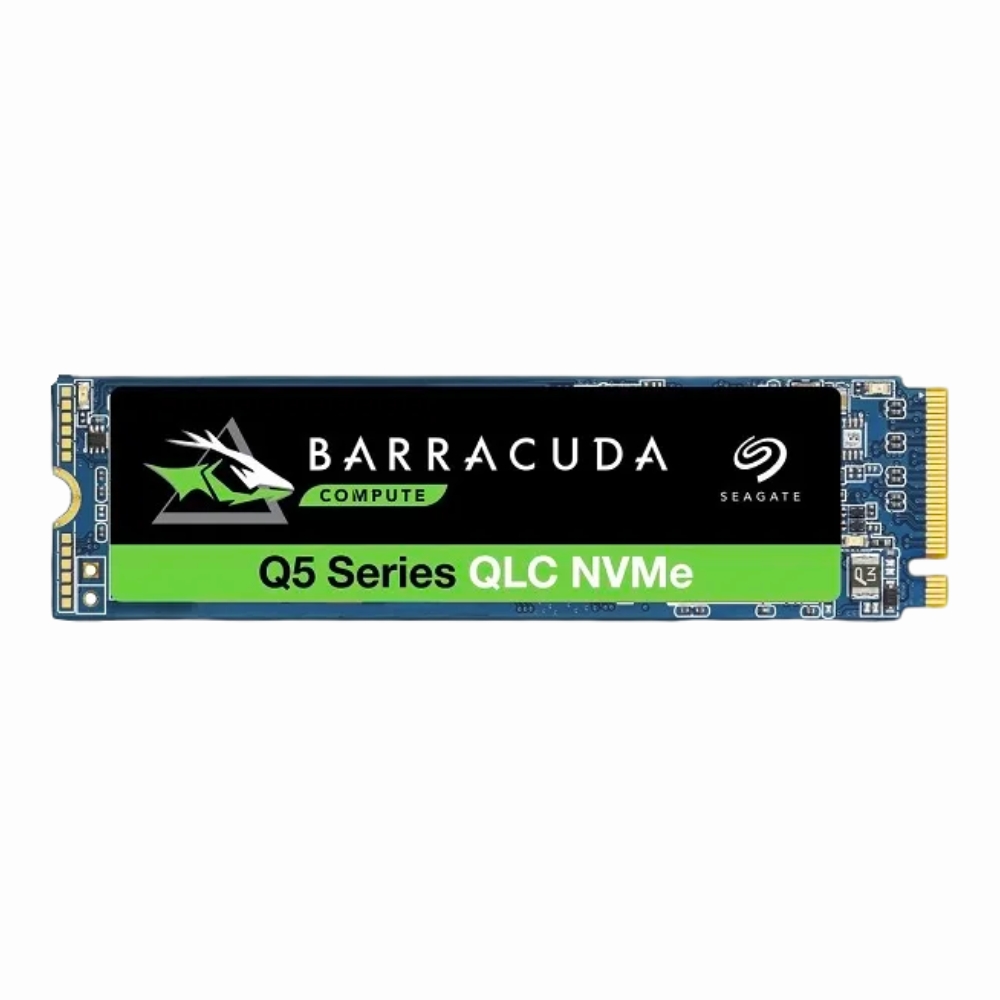
The Seagate BarraCuda Q5 500GB SSD offers a practical balance of storage capacity and speed, fitting neatly into M.2 slots on many computers. It’s designed to replace slower hard drives or older SSDs, providing a noticeable upgrade for everyday tasks, gaming, and light content creation. |
General Information |
|
|---|---|
| Brand | Seagate |
| Part Number | ZP500CV3A001 |
Technical Information |
|
|---|---|
| Capacity | 500GB |
| NAND Flash | Quad-Level Cell (QLC) |
| Memory Technology | Quad-Level Cell (QLC) |
| Form Factor | M.2 2280 |
| Interface | PCIe Gen 3.0 x4 |
| Cache | DRAM-less with SLC cache (host memory buffer support) |
| MTBF | 1.8 million hours |
| Hot Swappable | No |
| Hot Pluggable | No |
Performance |
|
|---|---|
| Max Sequential Read | 2100 MB/s |
| Max Sequential Write | 1700 MB/s |
| Random Read | 250,000 IOPS |
| Random Write | 220,000 IOPS |
| Endurance (TBW) | 180 TBW |
Physical Characteristics |
|
|---|---|
| Dimensions | 3.5 x 22 x 80 mm |
| Weight | 1.10 |
| Condition | Refurbished |
Miscellaneous |
|
|---|---|
| Eco Friendly | Yes |
| Compliance Standards | WEEE, RoHS, CE, FCC |
Product Description |
|---|
The Seagate BarraCuda Q5 500GB solid state drive is built for users who need reliable and speedy storage for daily tasks. It’s commonly found in desktop PCs and laptops that require a balanced mix of capacity and performance without breaking the bank. Often used in gaming setups and general productivity machines, this SSD offers a straightforward upgrade path from traditional hard drives. It's especially suited for casual gamers, students, and professionals who want faster boot times and quicker file access. Key Features
This SSD is typically installed in desktop and laptop systems where space-saving and performance improvements are needed. Users will notice smoother application launches and faster file transfers compared to older storage options. It plays a crucial role in improving system responsiveness without the expense of higher-tier drives, making it a practical choice for many computing environments. |
Use Cases |
|---|
The Seagate 500GB QLC PCIe NVMe SSD is suited for IT professionals and system integrators seeking a cost-effective yet efficient storage upgrade. It is ideal for environments requiring moderate capacity with accelerated data access, such as workstations and office desktops that handle mixed workloads. How It's Used:
This SSD facilitates operational responsiveness and system agility within moderate-demand scenarios, enabling better scalability for evolving workflows. Its balance of capacity and NVMe interface performance makes it a practical choice for targeted storage upgrades in diverse IT environments. |
 Shipping Options
 International Delivery
Requires a UPS, FedEx, or DHL account. Customers may arrange pickup from our US warehouse.
International Delivery
Requires a UPS, FedEx, or DHL account. Customers may arrange pickup from our US warehouse.
 Payment Methods
We accept Visa, Mastercard, AMEX, Discover, and Wire Transfer.
Payment Methods
We accept Visa, Mastercard, AMEX, Discover, and Wire Transfer.
 Purchase Orders
We process purchase orders for government agencies, enterprises, data centers, and SMBs.
Purchase Orders
We process purchase orders for government agencies, enterprises, data centers, and SMBs.