

Subscribe To Our Newsletter!
Subscribe to the newsletter to stay up to date with the latest news and most useful
Newsletter
↑
Back to Top



Product Overview |
|---|
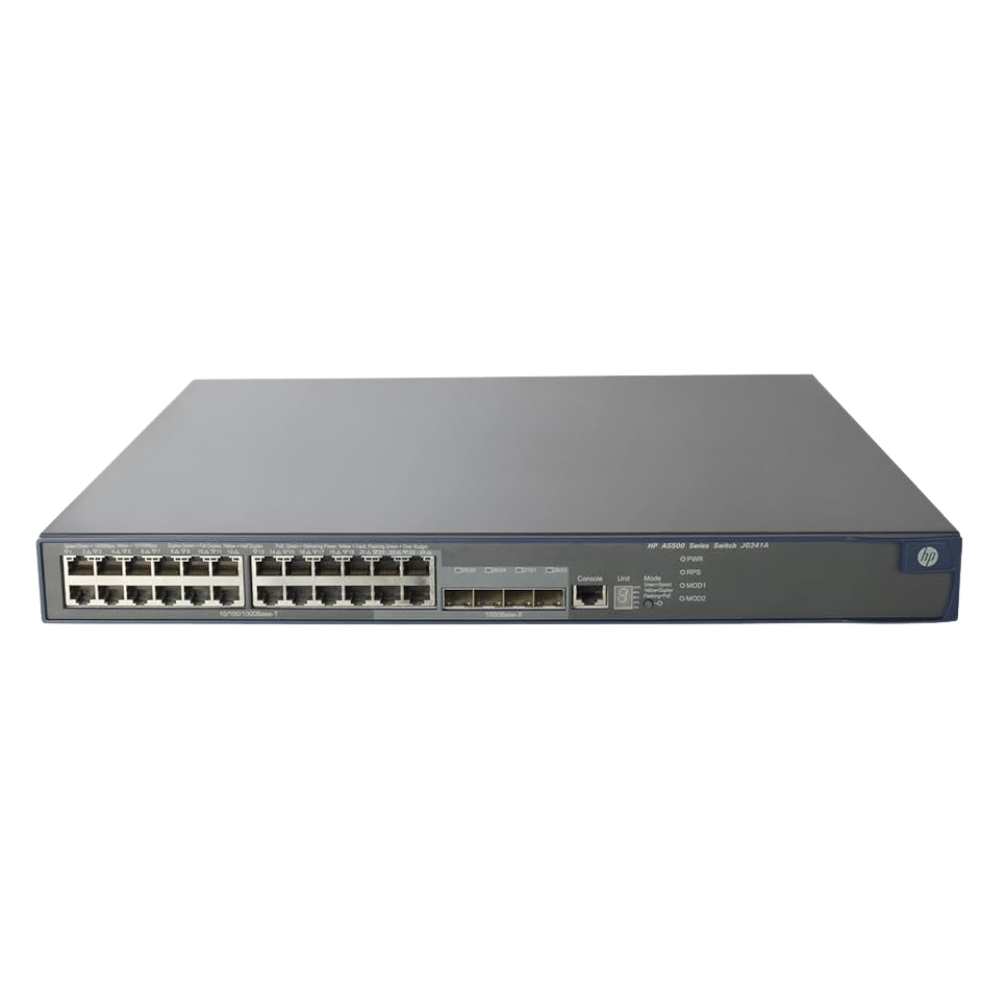
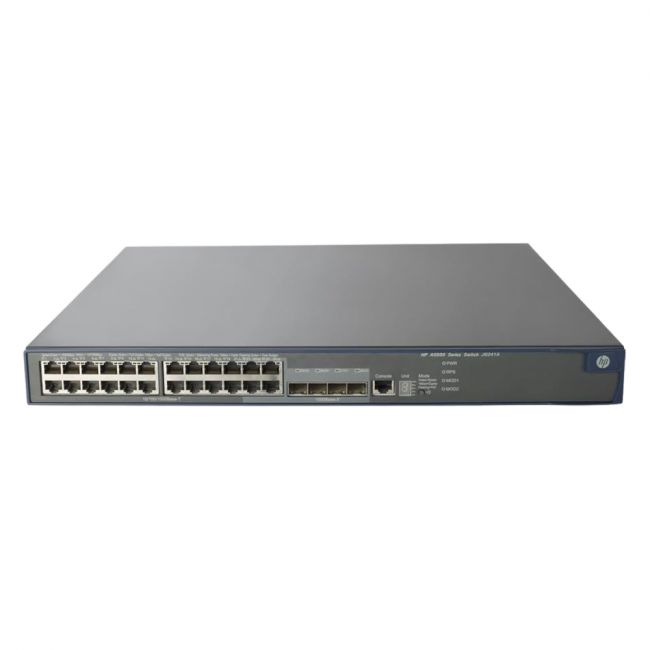
The JD371AR - HP 5500 24x RJ45 PoE+ 4x SFP Network EI Switch integrates Power over Ethernet plus capabilities across 24 RJ45 ports with four fiber SFP uplink slots, fitting into enterprise-level network setups. It balances straightforward Layer 2 switching with some Layer 3 static routing, providing a practical solution for managing network traffic and powering connected devices within office or campus environments. |
General Information |
|
|---|---|
| Brand | HP |
| Condition | Refurbished |
Technical Information |
|
|---|---|
| Switch Type | Layer 3, Managed Switch, Stackable Switch, PoE Switch, Gigabit Switch |
| Form Factor | Rack-Mountable |
| Mount Type | 1U Rack |
| Switch Ports | 24 |
| Number of Ports | 28-Ports |
| Port Type | 10/100/1000Base-T, 1000Base-X, USB Console, Serial Console (RJ-45) |
| Port Speed | 10/100/1000 Mbps |
| UpLink Ports | 4 x SFP (1000Base-X) |
| POE Support | PoE+ |
| Switching Capacity | 128 Gbps |
| Switch Forwarding Rate | 95.24 Mpps |
| DRAM | 256 MB |
| Flash Memory | 128 MB |
| VLAN Support | Yes |
| Max VLANs Supported | 1-4094 |
| Stackable | Yes |
| Layer Support | Layer 3 |
| Connector Type | RJ-45,SFP,USB Console,Serial Console (RJ-45) |
Performance |
|
|---|---|
| Jumbo Frame Support | Up To 9216 Bytes |
| MAC Address Table Size | 16000 |
Management and Configuration |
|
|---|---|
| Routing Protocols | Static, RIP, OSPF, OSPFv3, VRRP, PIM-SM, IGMP |
| Remote Protocols | Yes |
| Management Interfaces | Web GUI,CLI (Console),SSH,Telnet,SNMP (v1/v2c/v3),REST/HTTP(S) |
| Security Features | 802.1X,Access Control Lists (ACLs),RADIUS,TACACS+,DHCP Snooping,IP Source Guard,Dynamic ARP Inspection,Port Security |
| Management Type | Managed |
| Security | Yes (802.1X, ACLs, RADIUS/TACACS+) |
| Remote Management Protocol | SNMP,SSH,Telnet,HTTP,HTTPS |
| Routing Protocol | Static,RIP,OSPF,VRRP |
Power & Cooling |
|
|---|---|
| Fans | Yes (internal variable-speed fans) |
| Power | AC 100-240V, 50-60Hz; PoE budget 370W |
| Power Supply | Internal AC power supply (100-240VAC, 50-60Hz) |
Physical Characteristics |
|
|---|---|
| Dimensions | 1.73 x 17.32 x 12.99 in (44 x 440 x 330 mm) |
| Weight | 3.00 |
| Operating Temperature | 0°C to 45°C |
Miscellaneous |
|
|---|---|
| Eco Friendly | Yes |
| Assembly Required | No |
| Compliance Standards | WEEE, RoHS, CE, FCC, cULus |
| Compliant Standards | IEEE 802.3, IEEE 802.3u, IEEE 802.3ab, IEEE 802.3x, IEEE 802.1Q, IEEE 802.1p, IEEE 802.1D, IEEE 802.1w, IEEE 802.1s, IEEE 802.1X, IEEE 802.3at, IEEE 802.3af |
Product Description |
|---|
The JD371AR - HP 5500 24x RJ45 PoE+ 4x SFP Network EI Switch delivers efficient network connectivity with power over Ethernet on 24 ports, making it suitable for expanding wired networks with powered devices. Often found in mid-sized enterprise and campus network infrastructures, this switch provides a stable platform for both data and power distribution. Built for IT professionals managing business-grade networks, it offers essential Layer 2 switching combined with static routing to help streamline network traffic. The 4 SFP slots allow flexible connections to fiber optic networks, accommodating various network topologies and distances. Key Features
This switch plays a critical role in network infrastructure by combining power delivery and data switching in a single device. It supports reliable operation with consistent throughput and can handle the demands of typical office network environments. Its mix of PoE+ ports and fiber uplinks makes it adaptable for evolving network needs, balancing performance and operational simplicity without overcomplicating network design. |
Use Cases |
|---|
This network switch is commonly deployed in enterprise and campus networks where centralized power delivery and data connectivity are needed. It supports environments that require stable Ethernet connections alongside fiber uplinks for backbone or inter-switch links. How It's Used:
In these settings, the switch simplifies network management by combining data and power transmission, helping maintain operational stability and allowing for growth through flexible uplink options. It supports network scalability while maintaining performance consistency over time. |
 Shipping Options
 International Delivery
Requires a UPS, FedEx, or DHL account. Customers may arrange pickup from our US warehouse.
International Delivery
Requires a UPS, FedEx, or DHL account. Customers may arrange pickup from our US warehouse.
 Payment Methods
We accept Visa, Mastercard, AMEX, Discover, and Wire Transfer.
Payment Methods
We accept Visa, Mastercard, AMEX, Discover, and Wire Transfer.
 Purchase Orders
We process purchase orders for government agencies, enterprises, data centers, and SMBs.
Purchase Orders
We process purchase orders for government agencies, enterprises, data centers, and SMBs.