Subscribe To Our Newsletter!
Subscribe to the newsletter to stay up to date with the latest news and most useful
Newsletter
↑
Back to Top



Product Overview |
|---|
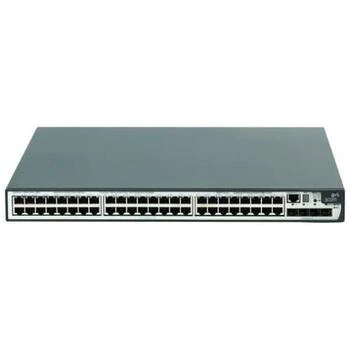
The HP E5500-48G Layer 3 switch combines a high port count with routing capabilities, fitting well into enterprise or campus networks. It handles both wired and fiber connections, allowing flexible setups and easy expansion to meet changing infrastructure demands. |
General Information |
|
|---|---|
| Brand | HP |
| Condition | Refurbished |
Technical Information |
|
|---|---|
| Number of Ports | 48-Ports |
| Port Type | 10/100/1000Base-T, SFP |
| Port Speed | 10/100/1000Base-T |
| UpLink Ports | 4 x SFP (mini-GBIC) |
| POE Support | No |
| VLAN Support | Yes |
| NIM Slot | 1 |
| Layer Support | Layer 3 |
| Connector Type | RJ-45,SFP (mini-GBIC) |
Performance |
|
|---|---|
| Jumbo Frame Support | Up To 9216 Bytes |
Management and Configuration |
|
|---|---|
| Remote Protocols | Yes |
| Management Interfaces | Serial Console (RJ-45),Web GUI,CLI,SNMP |
| Management Type | Web-based,CLI,SNMP |
| Remote Management Protocol | SNMP,HTTP,HTTPS,SSH |
Physical Characteristics |
|
|---|---|
| Weight | 3.00 |
Product Description |
|---|
The HP E5500-48G is a Layer 3 switch designed to manage and route network traffic effectively in medium to large-sized business environments. It is commonly used in enterprise network cores or distribution layers where both high port density and routing performance are essential. Built for network administrators and IT professionals, this switch supports a mix of copper and fiber connections, providing flexibility for various deployment scenarios. Its modular design allows easy expansion as network needs evolve. Key Features
This switch is often found in office buildings, data centers, and campus networks where high throughput and scalability matter. Its ability to handle multiple routing tasks while offering numerous ports makes it a practical choice for growing networks. Deploying the HP E5500-48G can simplify network management and improve traffic flow, helping IT teams maintain an efficient and reliable network setup. |
Use Cases |
|---|
The HP E5500-48G Layer 3 switch is commonly deployed in mid-sized enterprise networks and campus environments where high-density gigabit connectivity and advanced routing are essential. IT teams managing mixed workloads benefit from its combination of wired and fiber ports, enabling flexible network segmentation and resilient uplinks. How It's Used:
By integrating Layer 3 functionality with versatile port options, this switch enhances operational efficiency through streamlined traffic handling and supports scalability for evolving enterprise network architectures. Its modular design facilitates incremental upgrades while maintaining consistent performance across diverse network segments. |
 Shipping Options
 International Delivery
Requires a UPS, FedEx, or DHL account. Customers may arrange pickup from our US warehouse.
International Delivery
Requires a UPS, FedEx, or DHL account. Customers may arrange pickup from our US warehouse.
 Payment Methods
We accept Visa, Mastercard, AMEX, Discover, and Wire Transfer.
Payment Methods
We accept Visa, Mastercard, AMEX, Discover, and Wire Transfer.
 Purchase Orders
We process purchase orders for government agencies, enterprises, data centers, and SMBs.
Purchase Orders
We process purchase orders for government agencies, enterprises, data centers, and SMBs.