

Subscribe To Our Newsletter!
Subscribe to the newsletter to stay up to date with the latest news and most useful
Newsletter
↑
Back to Top



Product Overview |
|---|
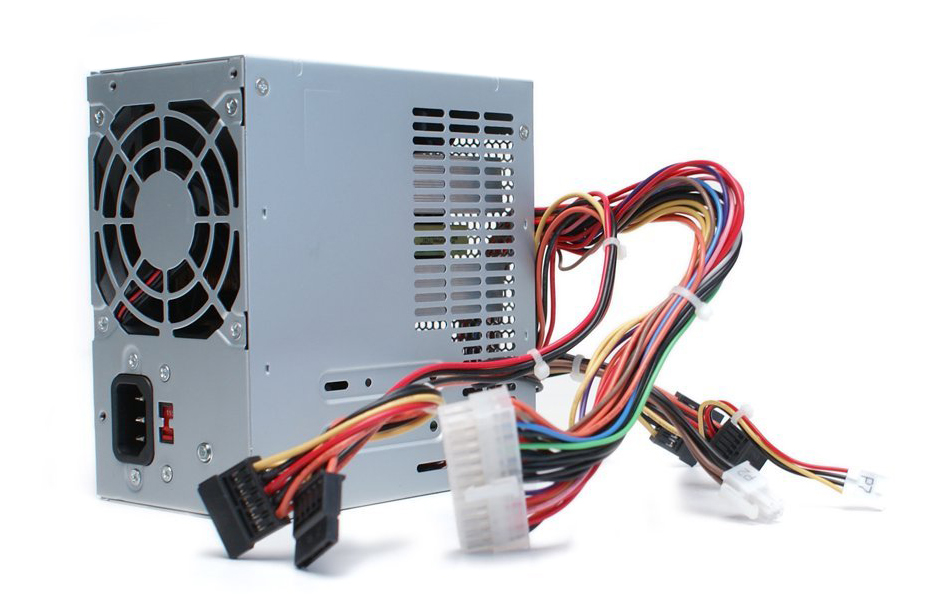
The Dell 300-Watts Power Supply for Inspiron and Vostro desktops provides reliable power tailored to specific Dell models. It fits into common desktop configurations while delivering the steady current needed to keep the system functioning properly during everyday use. |
General Information |
|
|---|---|
| Brand | Dell |
| Part Number | 0N385F |
| Product Type | Desktop Power Supply |
| Condition | Refurbished |
Technical Information |
|
|---|---|
| Input Voltage | AC 100-240V |
| Input Frequency | 50/60 Hz |
| Output | +12V, +5V, +3.3V, -12V, +5VSB |
| Max. Output Power | 300W |
| Hot Swappable | No |
| Redundant Support | No |
| Cooling Type | Active Fan |
| Modularity | Non-Modular |
| rail_design | Single 12V Rail |
| Number of Fans | 1 |
Compatibility |
|
|---|---|
| Form Factor | Proprietary |
| Compatible For | Dell Inspiron 518,Dell Inspiron 530,Dell Inspiron 531,Dell Inspiron 541,Dell Inspiron 560,Dell Inspiron 580,Dell Vostro 200,Dell Vostro 220,Dell Vostro 400 |
Connectors |
|
|---|---|
| Connector Types | 24-pin ATX, 4-pin CPU, SATA, Molex |
Physical Characteristics |
|
|---|---|
| Weight | 3.00 |
Certifications and Environmental |
|
|---|---|
| Compliance Standards | WEEE, RoHS, CE, cULus |
Product Description |
|---|
This 300-watt power supply is built for Dell Inspiron and Vostro desktops, ensuring consistent power delivery for various home and office computing tasks. It's commonly used in models like the Inspiron 518, 530, 531, 541, 560, 580, and Vostro 200, 220, 400 series. Often found in small business and personal desktop setups, this power supply supports reliable operation for daily workloads without interruptions. Users upgrading or replacing an existing power unit will find it matches the original specifications closely. Key Features
This power supply is typically deployed in office desktops and home PCs, where consistent power is key to system stability. It plays an essential role in ensuring the computer runs smoothly without unexpected shutdowns or power issues. |
Use Cases |
|---|
The Dell 300-Watt Power Supply Unit is primarily utilized in mid-range desktop systems within small to medium-sized business (SMB) environments and structured office setups. It benefits IT administrators managing Dell Inspiron and Vostro models, ensuring consistent power delivery critical for daily operational workloads and system stability. How It's Used:
This power supply supports operational continuity by delivering stable current specific to Dell system requirements, which aids in minimizing downtime and streamlining maintenance workflows. Its compatibility and form factor enhance scalability when managing fleet-wide hardware deployments within controlled IT environments. |
 Shipping Options
 International Delivery
Requires a UPS, FedEx, or DHL account. Customers may arrange pickup from our US warehouse.
International Delivery
Requires a UPS, FedEx, or DHL account. Customers may arrange pickup from our US warehouse.
 Payment Methods
We accept Visa, Mastercard, AMEX, Discover, and Wire Transfer.
Payment Methods
We accept Visa, Mastercard, AMEX, Discover, and Wire Transfer.
 Purchase Orders
We process purchase orders for government agencies, enterprises, data centers, and SMBs.
Purchase Orders
We process purchase orders for government agencies, enterprises, data centers, and SMBs.