

Subscribe To Our Newsletter!
Subscribe to the newsletter to stay up to date with the latest news and most useful
Newsletter
↑
Back to Top



Product Overview |
|---|
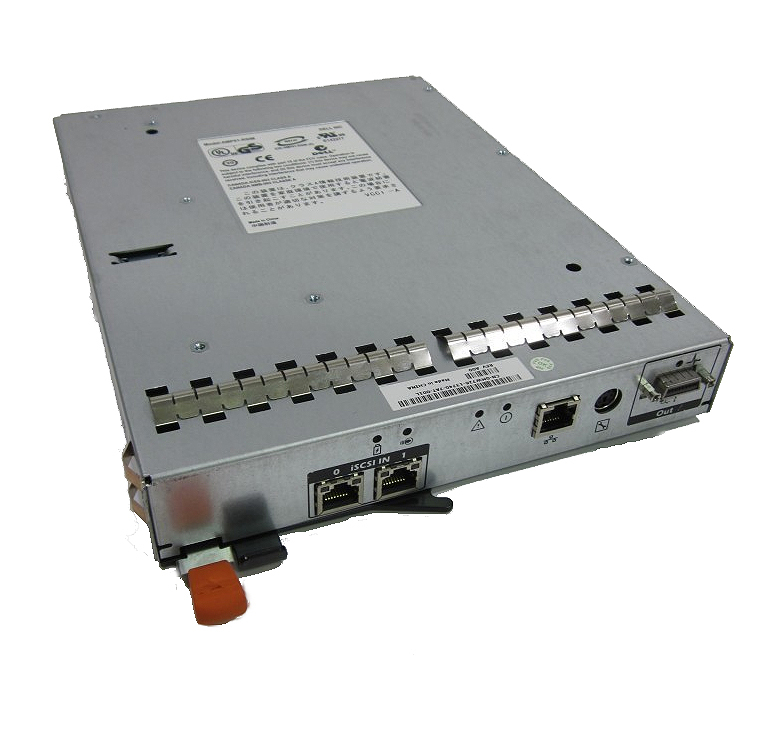
The Dell PowerVault MD3000i iSCSI RAID controller manages data storage across multiple hard drives, ensuring networked access and data protection through various RAID levels. It fits well into midrange storage setups where businesses need dependable, scalable SAN solutions without complex configurations. |
General Information |
|
|---|---|
| Brand | Dell |
| Part Number | 0T658D |
Technical Specification |
|
|---|---|
| Host Interface | iSCSI (Gigabit Ethernet) |
| Data Rate | 1 Gbit/s per port |
| RAID Levels | 0,1,5,6,10,50 |
| Cache | 512 MB battery-backed write cache (per controller) |
| Ports | 2 (RJ45 Gigabit Ethernet ports per controller) |
| Connectivity | Ethernet (iSCSI) |
| External Interface | RJ45 (10/100/1000Base-T) |
| Compatibility | Dell PowerVault MD3000i arrays; Windows Server, Linux, VMware ESXi (iSCSI hosts) |
Physical Characteristics |
|
|---|---|
| Form Factor | Controller module (for Dell PowerVault MD3000i 2U enclosure) |
| Weight | 5.00 |
| Condition | Refurbished |
Miscellaneous |
|
|---|---|
| Eco Friendly | Yes |
| Compliance Standards | WEEE, RoHS, CE, FCC, UL |
Product Description |
|---|
The Dell PowerVault MD3000i iSCSI RAID controller manages storage arrays by providing reliable RAID functionality and networked data access. Often found in data centers and server rooms, it handles data distribution and redundancy across multiple drives. Built for businesses needing scalable storage with fault tolerance, this controller supports various RAID configurations to suit different performance and protection needs. IT administrators rely on it to maintain data integrity and efficient access within iSCSI SAN environments. Key Features
This RAID controller is typically deployed in environments requiring centralized data storage with reliable backup and recovery options. It plays a key role in maintaining continuous access to important data while reducing the risk of drive failures impacting system uptime. |
Use Cases |
|---|
The 0T658D Dell iSCSI RAID Controller is predominantly utilized in midrange SAN environments where reliable, high-performance networked storage is critical. It is well-suited for IT departments managing consolidated storage arrays requiring flexible RAID configurations to balance capacity and redundancy. How It's Used:
This controller enhances operational efficiency by streamlining storage management and enabling scalable SAN growth. Its compatibility with Ethernet networks supports robust performance in diverse IT infrastructures without the complexity of fibre channel setups. |
 Shipping Options
 International Delivery
Requires a UPS, FedEx, or DHL account. Customers may arrange pickup from our US warehouse.
International Delivery
Requires a UPS, FedEx, or DHL account. Customers may arrange pickup from our US warehouse.
 Payment Methods
We accept Visa, Mastercard, AMEX, Discover, and Wire Transfer.
Payment Methods
We accept Visa, Mastercard, AMEX, Discover, and Wire Transfer.
 Purchase Orders
We process purchase orders for government agencies, enterprises, data centers, and SMBs.
Purchase Orders
We process purchase orders for government agencies, enterprises, data centers, and SMBs.