

Subscribe To Our Newsletter!
Subscribe to the newsletter to stay up to date with the latest news and most useful
Newsletter
↑
Back to Top



Product Overview |
|---|
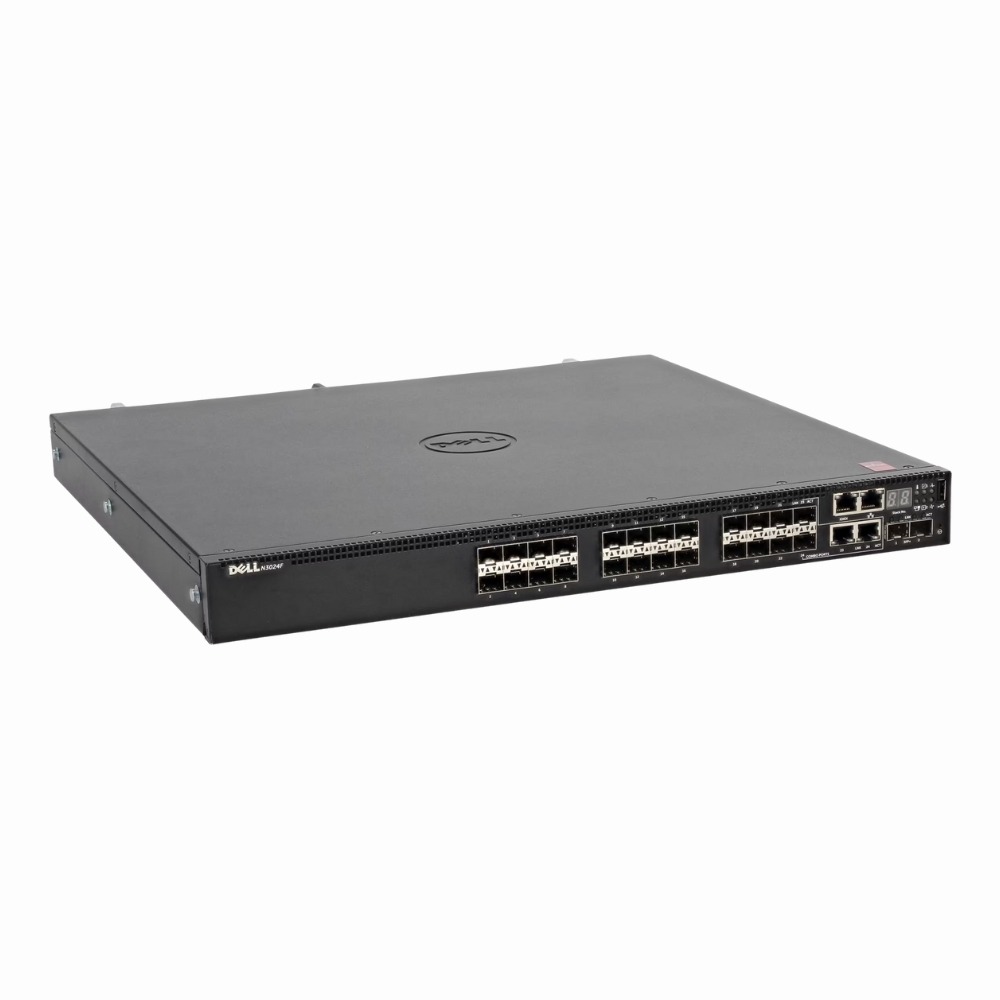
The Dell Networking N3024F switch is designed to provide flexible and reliable gigabit connectivity primarily through fiber optic ports, making it well suited for enterprise and data center environments. It balances a high number of fiber ports with additional 10 GbE uplinks and combo copper/fiber ports, fitting into rack-mounted setups where space and performance are both important. |
General Information |
|
|---|---|
| Brand | Dell EMC |
| Part Number | 04NDT8 |
| Condition | Refurbished |
Technical Information |
|
|---|---|
| Switch Type | Layer 3, Managed Switch |
| Form Factor | Rack-Mountable |
| Mount Type | 1U Rack |
| Switch Ports | 24 × Gigabit SFP + 2 × 10 Gb SFP+ + 2 × Gigabit combo ports |
| Number of Ports | 28-Ports |
| Port Type | 1000Base-T, 10G SFP+, Combo RJ-45/SFP, SFP |
| Port Speed | 1 GbE (SFP), 10 GbE (SFP+), 1 GbE (combo) |
| UpLink Ports | 2 x 10G SFP+ (SFP+),2 x Combo RJ-45/SFP (1000Base-T/1000Base-X) |
| POE Support | No |
| Switching Capacity | 212 Gbps full duplex |
| Switch Forwarding Rate | 158 Mpps |
| Flash Memory | 256MB |
| VLAN Support | Yes |
| Max VLANs Supported | 4094 |
| Layer Support | Layer 2 |
| Connector Type | SFP, SFP+, RJ‑45 combo |
Performance |
|
|---|---|
| Jumbo Frame Support | Up To 9216 Bytes |
Management and Configuration |
|
|---|---|
| Routing Protocols | Static |
| Remote Protocols | Yes |
| Management Interfaces | Serial Console (RJ-45),USB Console,CLI,Web GUI,SNMP |
| Security Features | 802.1X,Access Control Lists (ACLs),Port Security,RADIUS,SSH,Storm Control,DHCP Snooping |
| Management Type | CLI, GUI (web), SNMP, RMON, USB auto‑config, Dell OpenManage |
| Security | AAA, 802.1x, RADIUS, TACACS+, SSH, ACLs, port security, storm control, NAC |
| Remote Management Protocol | CLI, SNMPv2/v3, HTTP/HTTPS, Telnet, SSH, RMON |
| Routing Protocol | OSPF, RIP v1/v2, OSPFv3, VRRP, PIM‑SM/DM, IGMPv2/v3, MLDv2 |
Power & Cooling |
|
|---|---|
| Power | 100–240V AC, 50/60Hz |
Physical Characteristics |
|
|---|---|
| Dimensions | 1.75 x 17 x 6.75 inches |
| Weight | 7.00 |
| Operating Temperature | 0°C to 40°C |
Miscellaneous |
|
|---|---|
| Compliance Standards | WEEE, RoHS, CE, FCC |
| Compliant Standards | IEEE 802.1d/q/p/w/s/v/1x/1ab/1ag; IEEE 802.2, 802.3/u/z/ab/ae/ac/ad/az; 802.3x (full duplex flow control) |
Product Description |
|---|
The Dell Networking N3024F is a Layer 2 managed switch built for environments that require reliable gigabit connectivity with fiber optic support. Often found in data centers, enterprise networks, and campus backbones, it provides a mix of fiber and copper ports to suit various network designs. Network administrators and IT teams benefit from its flexible port configurations and management features, allowing smooth integration and control over traffic. Its rack-mountable design makes it convenient for standard networking racks. Key Features
This switch is typically deployed in enterprise wiring closets and data center access layers where both speed and flexibility are needed. It handles demanding network traffic smoothly and supports growth through its multiple uplink options. The N3024F helps maintain a stable and scalable network infrastructure without unnecessary complexity. |
Use Cases |
|---|
The Dell Networking N3024F switch is optimized for environments requiring high-density fiber connectivity with scalable uplink options, making it ideal for enterprise data centers and campus networks. IT teams managing virtualized workloads or storage clusters benefit from its flexible port configurations and Layer 2 management features. How It's Used:
By combining extensive fiber port availability with 10 Gb uplinks and flexible combo ports, the N3024F enhances operational efficiency and scalability in demanding network topologies. Its rack-mount design and managed features enable precise control over traffic flows, accommodating evolving enterprise and data center bandwidth requirements. |
 Shipping Options
 International Delivery
Requires a UPS, FedEx, or DHL account. Customers may arrange pickup from our US warehouse.
International Delivery
Requires a UPS, FedEx, or DHL account. Customers may arrange pickup from our US warehouse.
 Payment Methods
We accept Visa, Mastercard, AMEX, Discover, and Wire Transfer.
Payment Methods
We accept Visa, Mastercard, AMEX, Discover, and Wire Transfer.
 Purchase Orders
We process purchase orders for government agencies, enterprises, data centers, and SMBs.
Purchase Orders
We process purchase orders for government agencies, enterprises, data centers, and SMBs.